MLXIO
a close up view of the back side of a computer
TechnologyMay 22, 2026· 6 min read· By MLXIO Insights Team

Four 6K Displays, One Catch: FusionDock Ultra Locks Out PCs

Share

MLXIO Intelligence

Analysis Snapshot

60
Moderate
Confidence: LowTrend: 10Freshness: 96Source Trust: 100Factual Grounding: 92Signal Cluster: 20

Moderate MLXIO Impact based on trend velocity, freshness, source trust, and factual grounding.

Thesis

High Confidence

iVanky’s FusionDock Ultra is a high-end Mac-focused workstation dock whose four-6K-display headline capability depends heavily on the connected Apple-silicon host and does not extend to Windows PCs or older Macs.

Evidence

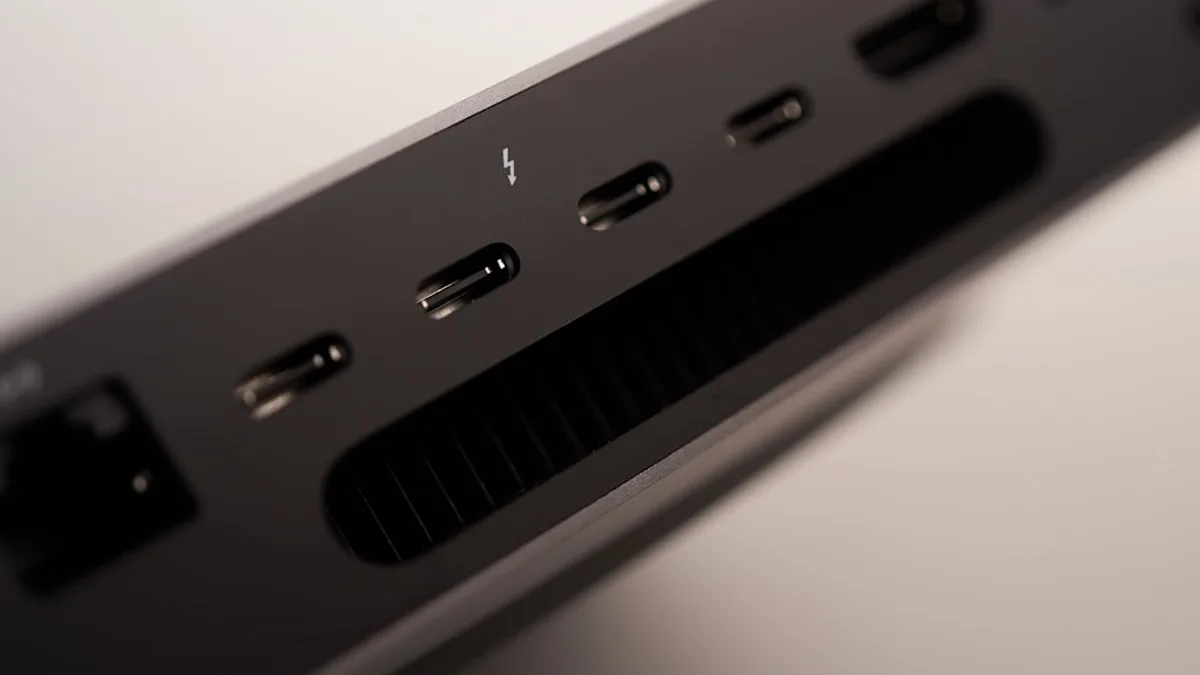
  • FusionDock Ultra offers 26 ports, including four USB-C video outputs, DisplayPort 2.1, HDMI 2.0, 10 Gbps Ethernet, UHS-II SD and microSD readers, audio jacks, and optical audio output.
  • The dock connects to a Mac through two separate host cables rather than a single cable.
  • Notebookcheck reports a Mac mini M1 supports only one 6K display at most, while Mac Studio with M4 Max or M3 Ultra can drive four 6K displays at 60Hz.
  • The dock is listed as available through Amazon for $650 and is built for Macs with Apple’s own SoCs, not Windows PCs or older Macs.

Uncertainty

  • Exact compatibility across all supported Mac models varies by device.
  • The article does not specify whether all 26 ports can be used simultaneously without bandwidth or power limits.
  • Real-world performance with multiple displays, storage, and 10 Gbps Ethernet active at once is not tested in the article.

What To Watch

  • Hands-on reviews testing four 6K displays, two 8K displays, and lower-resolution high-refresh setups.
  • Clarification from iVanky on full Mac model compatibility and unsupported older Macs.
  • User reports on stability when using networking, charging, storage, and multi-display outputs concurrently.

Verified Claims

iVanky’s FusionDock Ultra has 26 ports and is positioned as a high-end desktop expansion dock for Mac users.
📎 Article states: "26 ports" and describes it as "a premium desktop expansion dock aimed at Mac users."High
FusionDock Ultra connects to a Mac using two separate host cables rather than a single host cable.
📎 Article states: "The dock does not use a single host cable. It connects to a Mac through two separate cables."High
FusionDock Ultra supports 10 Gbps Ethernet and is described as useful for high-performance access to network storage.
📎 Article lists "10 Gbps Ethernet" and says Notebookcheck points to "high-performance access to network storage."High
FusionDock Ultra can support up to four 6K displays at 60Hz on a Mac Studio with M4 Max or M3 Ultra, but display capability varies by host Mac.
📎 Article states a "Mac Studio with M4 Max and M3 Ultra can connect four 6K displays at 60Hz" and that "maximum display setup depends on the host Mac."High
FusionDock Ultra is built for Macs with Apple SoCs and is not intended for Windows PCs or older Macs.
📎 Article states it is "built for Macs with Apple’s own SoCs, not Windows PCs or older Macs."High

Frequently Asked

How many ports does the iVanky FusionDock Ultra have?

The FusionDock Ultra has 26 ports, including video outputs, Ethernet, card readers, audio connections, and charging support.

Can the FusionDock Ultra connect four 6K displays?

Yes, but only with supported Macs. The article says a Mac Studio with M4 Max or M3 Ultra can connect four 6K displays at 60Hz through the dock.

Does the FusionDock Ultra work with Windows PCs?

No. The article says the FusionDock Ultra is built for Macs with Apple’s own SoCs, not Windows PCs or older Macs.

What networking speed does the FusionDock Ultra support?

The FusionDock Ultra supports 10 Gbps Ethernet, which the article connects to high-performance access to network storage.

How much charging output does the FusionDock Ultra provide?

The dock supports up to 140 watts of maximum output for devices including MacBooks, iPhones, and iPads.

Updated on May 22, 2026

26 ports, support for four 6K displays, and 10 Gbps Ethernet put iVanky’s new FusionDock Ultra squarely in the “only if your desk is already out of ports” category. The dock is now available through Amazon for $650, but the headline capability comes with a hard limit: it is built for Macs with Apple’s own SoCs, not Windows PCs or older Macs, according to Notebookcheck.

FusionDock Ultra debuts with support for four 6K displays and 10Gbps connectivity

The FusionDock Ultra is a premium desktop expansion dock aimed at Mac users who need far more than a typical USB-C hub. iVanky is pitching it around display density, fast wired networking, charging, storage access, audio, and broad peripheral support in one unit.

The dock does not use a single host cable. It connects to a Mac through two separate cables, a design choice that immediately separates it from simpler docking stations and explains part of its workstation focus.

Power delivery is also part of the package. Connected laptops such as MacBooks can be charged through the dock, with a maximum supported output of 140 watts for devices including MacBooks, iPhones, and iPads. Notebookcheck also says wireless headphones can be charged.

The video side is the main draw. FusionDock Ultra includes four USB-C ports for video output, plus DisplayPort 2.1 and HDMI 2.0. The maximum display setup depends on the host Mac, not just the dock.

Capability FusionDock Ultra detail
Total ports 26 ports
Host connection Two separate cables to the Mac
Display outputs 4 USB-C, DisplayPort 2.1, HDMI 2.0
Networking 10 Gbps Ethernet
Charging Up to 140 watts maximum output
Storage slots UHS-II SD and microSD card readers
Audio Three 3.5 mm audio jacks plus optical audio output

That makes the dock less a travel accessory and more a fixed desk anchor. It is designed to turn a MacBook or compact Mac workstation into a multi-display command center without forcing users to plug half a dozen cables directly into the machine.


Four-display 6K support targets creators, traders, engineers, and power users

The most aggressive display claim applies only to specific Macs. Notebookcheck reports that a Mac mini M1 supports only one 6K display at most, while a Mac Studio with M4 Max and M3 Ultra can connect four 6K displays at 60Hz through the FusionDock Ultra. Two 8K displays are also possible.

Lower resolutions or fewer monitors can allow higher refresh rates. That detail matters for buyers who may care less about maximum pixel count and more about responsiveness across fewer screens.

Host Mac cited Display support cited
Mac mini M1 Up to one 6K display
Mac Studio with M4 Max Up to four 6K displays at 60Hz
Mac Studio with M3 Ultra Up to four 6K displays at 60Hz
Supported Macs generally Varies by device

For video editors, engineers, 3D designers, software developers, and traders, the value is not just “more screens.” It is the ability to keep high-resolution timelines, dashboards, terminals, preview windows, chat, storage tools, and monitoring apps visible at the same time.

The 10 Gbps Ethernet port gives the dock another workstation-grade angle. Notebookcheck specifically points to high-performance access to network storage, which is a practical fit for large media files, backups, shared project storage, and office networks built around fast wired infrastructure.

The broader design choice is clear: iVanky is not trying to solve the average laptop owner’s shortage of USB-A ports. It is targeting users whose laptop or compact desktop has become the center of a heavier production setup.

That Mac focus also intersects with the kind of premium hardware cycles MLXIO readers follow, including Apple’s pro-device roadmap in Apple Bets Big on OLED MacBook Pro Despite Delay Rumors and creator-adjacent gear like Insta360 Luna Ultra Packs Remote and Case, Shaking DJI’s Grip. Neither changes the FusionDock Ultra’s compatibility limits, but both sit near the same high-end buyer budget conversation.

26 ports are only useful if your Mac can actually drive them

FusionDock Ultra’s main caveat is not hidden in fine print: Windows PCs and older Macs are out. The dock works only with Macs powered by Apple’s in-house SoCs.

That narrows the audience sharply. It also means buyers need to check their exact Mac model before treating the “four 6K displays” figure as a guaranteed setup.

The port count is unusually broad. Beyond video and Ethernet, the dock includes UHS-II readers for both SD and microSD, three analog audio jacks, and an optical audio output. For photo, video, and audio workflows, that reduces the need for separate adapters.

The two-cable host setup is the trade-off. It can deliver more aggregate connectivity than a simpler dock, but it also consumes more Mac ports and makes desk layout more important.

Independent review material in the supplied sources adds a useful caution. AppleInsider reported a peak of 48.7 DBa in a 41.1 DBa office space when the dock was loaded with multiple monitors and I/O. Cult of Mac listed “runs warm despite dual fans” as a con.

That does not undercut the specs. It does remind buyers that a dock designed to carry multiple displays, high-speed Ethernet, card readers, audio, charging, and USB devices is still a thermal and bandwidth balancing act.


Price, Mac model, and real workloads decide whether $650 makes sense

At $650, FusionDock Ultra is not competing with commodity hubs. It is a workstation accessory for users who can name the devices they plan to plug into most of its 26 ports.

The strongest case is a Mac Studio or high-end Mac setup that can actually use the multi-display ceiling, especially where 10 Gbps Ethernet and card readers matter every day. The weakest case is a user with a Mac that cannot drive the promised displays or a desk that only needs a few peripherals.

The practical checklist is simple:

  • Confirm the Mac: Apple SoC support is required, and display limits vary by model.
  • Map the monitors: Four 6K displays at 60Hz is not universal across all supported Macs.
  • Plan the cabling: The dock needs two host connections, not one.
  • Check the network: 10 Gbps Ethernet only pays off if the rest of the wired setup can match it.
  • Mind heat and noise: Early review data points to active cooling that may be audible under load.

The next test is not whether FusionDock Ultra has enough ports. On paper, it has more than most desks can fill. The question is whether a specific Mac, monitor stack, network, and peripheral load can turn that port count into a stable daily workstation.

Key Takeaways

  • FusionDock Ultra targets high-end Mac workstation users who need extensive display and peripheral expansion.
  • Its four 6K display support, 10 Gbps Ethernet, and 140-watt charging make it far beyond a typical USB-C hub.
  • The $650 price and Apple Silicon-only support make compatibility and need important buying considerations.


FusionDock Ultra Key Port Counts

Total ports
ports26
USB-C video outputs
ports4
MLXIO

Written by

MLXIO Insights Team

Algorithmic Research & Human Oversight

Powered by advanced algorithmic research and perfected by human oversight. The Insights Team delivers highly structured, cross-verified analysis on emerging tech trends and digital shifts, filtering out the fluff to give you high-fidelity value.

Related Articles

black iphone 7 with white and black dice
TechnologyJul 27, 2026

£16.99 AppleCare One Locks UK Devices Into One Bill

AppleCare One bundles up to three UK devices for £16.99 a month, making protection another recurring Apple bill.

7 min read

person holding black android smartphone
TechnologyAug 1, 2026

Apple Upgrade Puts Apple Card Installments on Notice

Apple Upgrade makes Apple Card Monthly Installments look less essential as Apple prepares to switch issuers.

8 min read

a cell phone and a laptop on a table
TechnologyJul 28, 2026

Apple Upgrade Turns iPhones, Macs and iPads Into Leases

Apple Upgrade turns iPhone, iPad, Mac and Watch ownership into a lease, with AppleCare+ now separate and Klarna in the middle.

7 min read

Close-up of a smartphone camera lens array
TechnologyJul 25, 2026

Weird Pixel Art Invades Your iPhone Camera With NeoCam

NeoCam turns the iPhone viewfinder into live Game Boy-style pixel art, with video and exports behind a $5.99 Plus upgrade.

7 min read

two pens near MacBook Air
TechnologyAug 4, 2026

EU Pressure Cracks iPhone Clipboard Open to Windows PCs

Apple will open iPhone clipboard syncing to Windows PCs in the EU, but the feature may not arrive until fall 2027.

8 min read

person holding black android smartphone
FinanceJul 4, 2026

Checkout Cash: Apple Pay Turns Amex Points Spendable

Amex cardholders can now redeem Membership Rewards inside Apple Pay, turning points into a checkout decision instead of a portal chore.

7 min read

people in a city with high rise buildings and trees during daytime
FinanceAug 2, 2026

$340 Apple Stock Cut Reveals JP Morgan's Memory Crunch

JP Morgan trimmed Apple’s target to $340 as memory shortages threaten Q4 supply despite strong iPhone 17 and Siri AI demand.

11 min read

person holding phone
AI / MLJul 20, 2026

Adobe Slips AI Editing Into Project Indigo Camera App

Adobe is testing free AI Playground edits inside Project Indigo, but only a few users get the opt-in tools for a few weeks.

6 min read

two black fish finders on a fishing boat
TechnologyAug 5, 2026

Apple CarPlay Grabs the Helm on 2027 Pontoon Boats

Apple CarPlay and Android Auto are coming standard to select 2027 Crest and Balise pontoons with Savvy Navvy navigation.

7 min read

a person holding a smart phone in their hand
TechnologyAug 4, 2026

18-Hour Motorola Razr Fold Leaves Samsung Chasing Hard

Motorola’s Razr Fold hit 18h22m browsing, beating Samsung’s Galaxy Z Fold7 by about four hours.

7 min read

Stay ahead of the curve

Get a weekly digest of the most important tech, AI, and finance news — curated by AI, reviewed by humans.

No spam. Unsubscribe anytime.